iOS Shortcuts for Automatic Habit Tracking on iPhone
Table of Contents
- What Are iOS Shortcuts?
- How Habit Trackers Work with iOS Shortcuts
- Choosing the Right Trigger
- Step-by-Step: Create Your First Habit Automation
- Prerequisites
- Creating a Time-Based Automation
- Creating a Location-Based Automation
- Creating a Workout-Triggered Automation
- 5 Powerful Habit Automation Ideas
- 1. Morning Routine When You Disable Your Alarm
- 2. Workout Logged After Apple Fitness
- 3. Reading Habit When Sleep Focus Activates
- 4. Gym Arrival Confirmation
- 5. Journaling When You Open Notes
- Troubleshooting Common Issues
- The Fastest Ways to Track Habits on iPhone
- The Science Behind Automated Tracking
- Automations as Digital Implementation Intentions
- Reducing Tracking Friction
- How Long Until Habits Become Natural?
- Frequently Asked Questions
- Do iOS Shortcuts work with all habit tracker apps?
- Can I automate multiple habits with a single trigger?
- Does location-based automation drain my iPhone battery?
- Will my automated habits still count if I'm offline?
- How many automations can I create in iOS Shortcuts?
- Start Automating Your Habits Today
- References
What if your habits could track themselves? With iOS Shortcuts, you can automate habit logging so it happens in the background, no manual tapping required.
#What Are iOS Shortcuts?
iOS Shortcuts is Apple's built-in automation platform that lets you create custom workflows on your iPhone and iPad. According to Apple's official documentation, Shortcuts can combine actions from multiple apps and trigger them automatically based on conditions like:
- Time of day: Run automations at specific times
- Location: Trigger when you arrive or leave a place
- App opening: Execute when you open certain apps
- Workout completion: Activate after finishing an Apple Fitness workout
- Focus modes: Run when Do Not Disturb or Sleep Focus turns on
#How Habit Trackers Work with iOS Shortcuts
Many habit tracking apps integrate with iOS Shortcuts through Apple's Intents framework. For example, Daily: Habit & Routine Tracker is a habit tracker that offers full Shortcuts support. Apps with Shortcuts integration allow you to:
- Complete habits automatically via Shortcuts actions
- Trigger habit completion from any automation
- Skip manual logging entirely for automated habits
The integration works the same way across most habit apps that support Shortcuts:
- Create your habits in your habit tracking app
- Open the Shortcuts app and create a Personal Automation
- Choose a trigger (time, location, app, workout, etc.)
- Add the "Complete Habit" action from your habit app
- Select which habit to mark complete
- Enable "Run Immediately" to skip confirmation prompts
Once set up, the automation runs in the background whenever your trigger conditions are met.
#Choosing the Right Trigger
Not all triggers are equal. Some are more reliable than others, and the best choice depends on the type of habit you're automating. Here's a quick comparison:
| Trigger | Best For | Example | Reliability |
|---|---|---|---|
| Time of Day | Daily habits | Meditation, vitamins | Very high |
| Location (Arrive) | Place-specific | Gym, office | High |
| Workout Ends | Fitness habits | Exercise | Very high |
| App Opens | Digital habits | Journaling | Medium |
| Focus Mode | Routine habits | Sleep routine | High |
| NFC Tag | Physical location | Home office | Very high |
Time-based triggers are the most reliable because they don't depend on sensors or app activity. Location triggers work well but can occasionally delay by a few minutes depending on GPS accuracy. App-based triggers are the least reliable because iOS may not always detect app launches in the background.
#Step-by-Step: Create Your First Habit Automation
#Prerequisites
- iPhone or iPad running iOS 15 or later
- A habit tracking app with Shortcuts support
- The habit you want to automate already created in your app
#Creating a Time-Based Automation
- Open the Shortcuts app
- Tap the Automation tab at the bottom
- Tap + New Automation
- Select Time of Day
- Set your desired time (e.g., 7:00 AM for morning habits)
- Tap Next
- Search for your habit app and select "Complete Habit"
- Choose the habit you want to complete
- Toggle off "Ask Before Running" for seamless automation
- Tap Done
#Creating a Location-Based Automation
Perfect for habits like "Arrive at gym" or "Leave work." Your habits complete themselves based on where you are. Here's a full walkthrough:
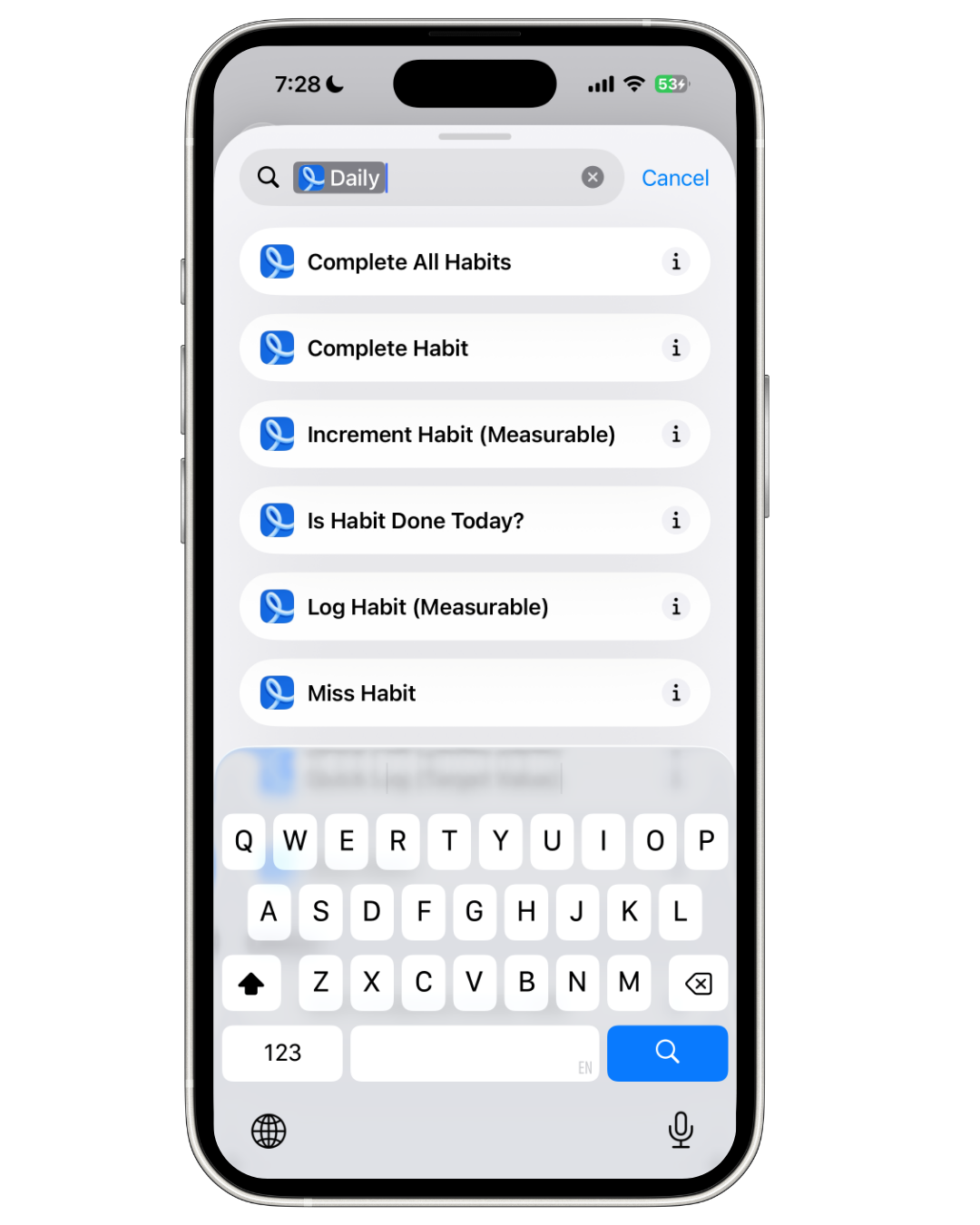
Step 1: Create a Shortcut with the Complete Habit action
Open the Shortcuts app, tap + to create a new shortcut, and search for "Daily" to find the habit actions. You'll see options like Complete All Habits, Complete Habit, Increment Habit, and more.
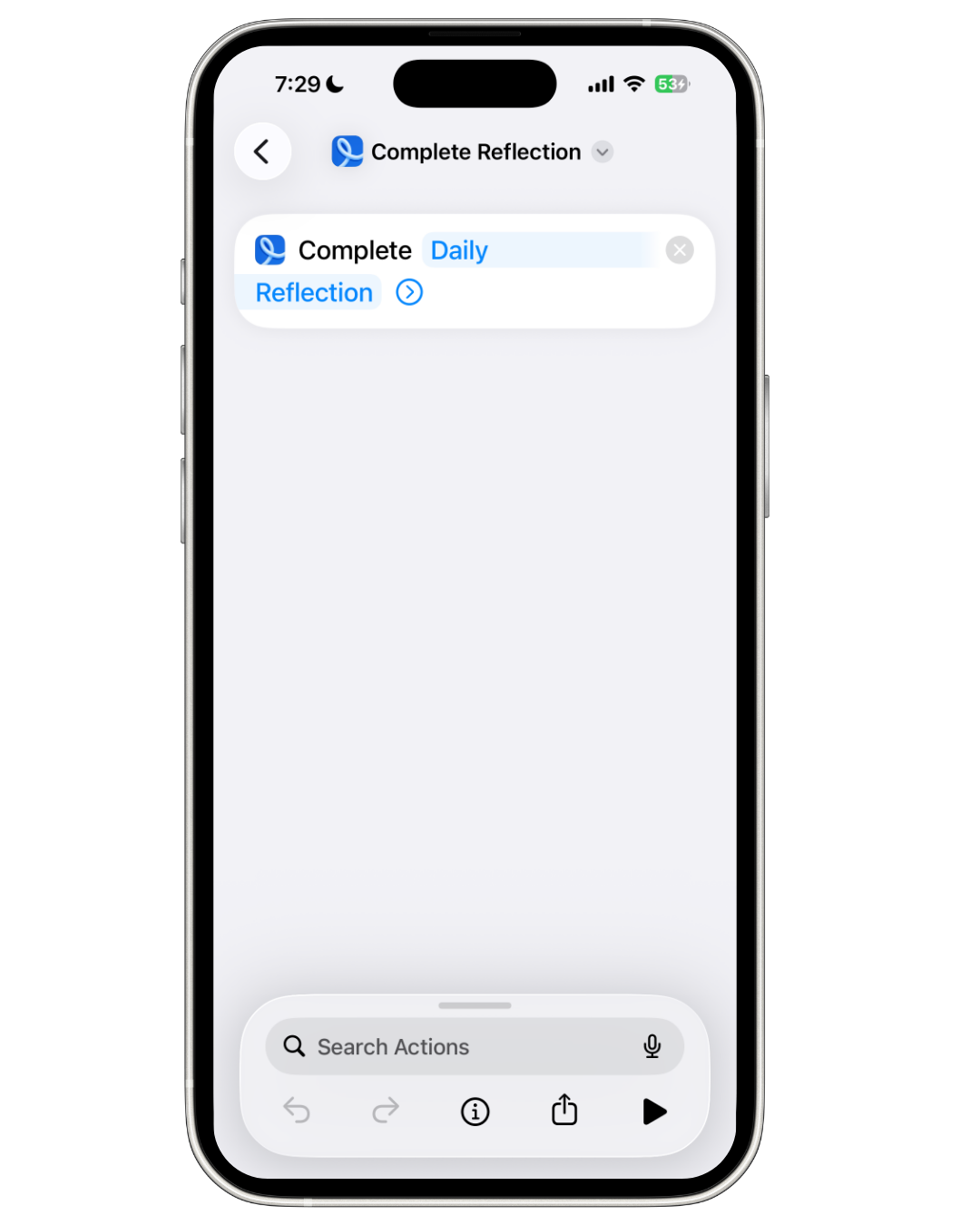
Step 2: Choose the habit to complete and rename the shortcut
Select Complete Habit and pick the specific habit you want to auto-complete (e.g., "Daily Reflection"). Rename the shortcut to something descriptive so it's easy to find when setting up automation.
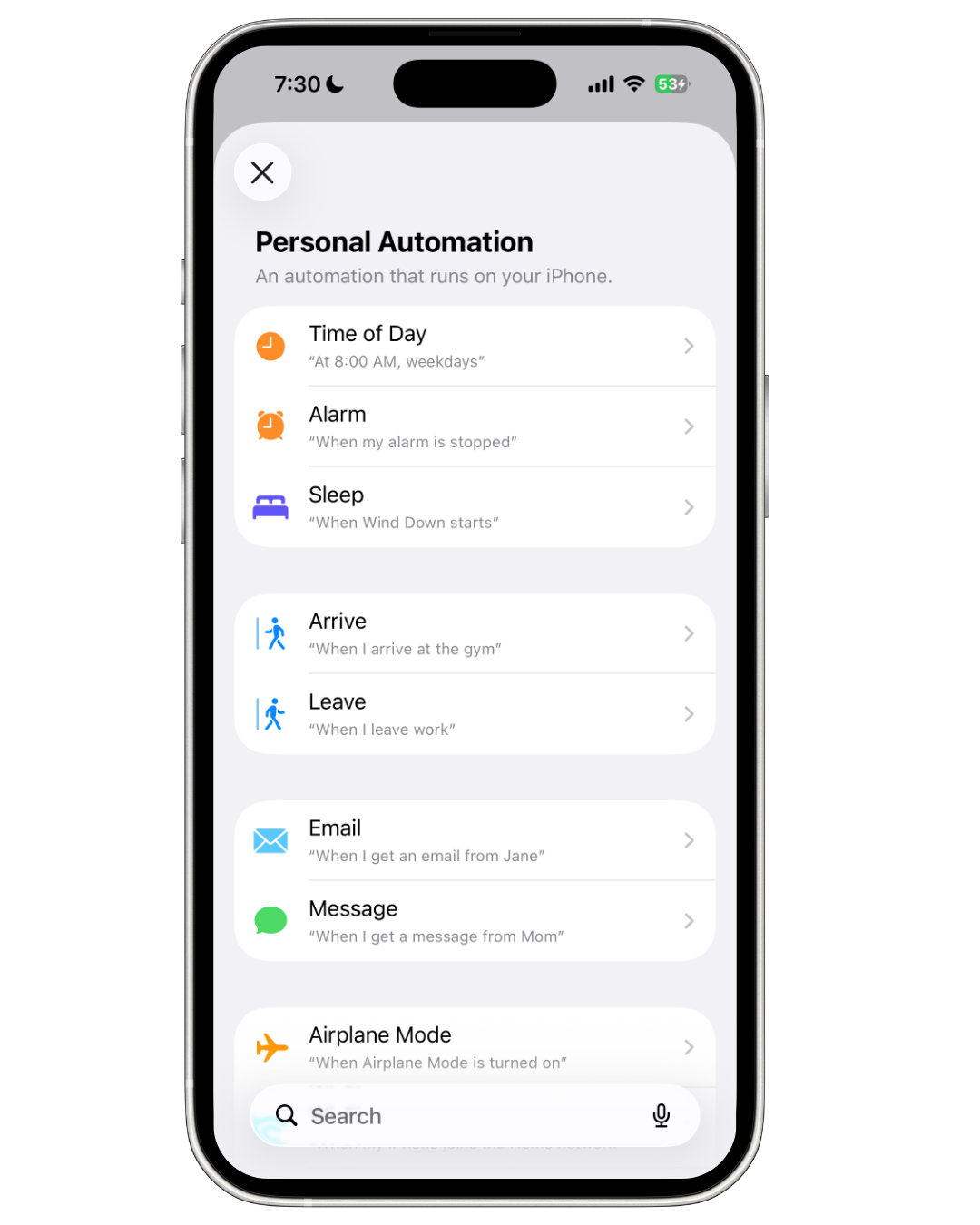
Step 3: Switch to the Automation tab and create a trigger
Tap the Automation tab at the bottom of the Shortcuts app, then tap +. You'll see all available triggers. Select Arrive for location-based automation.
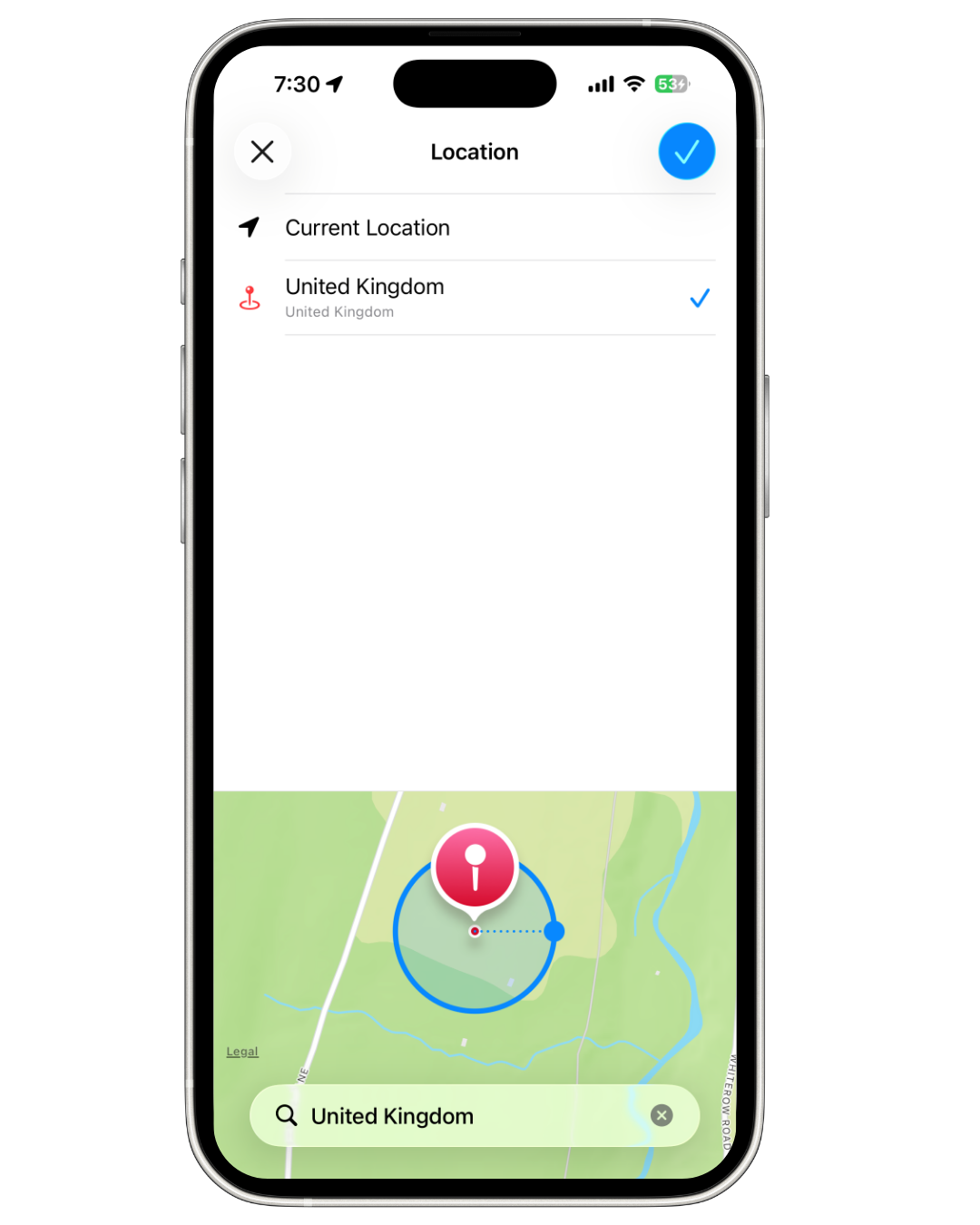
Step 4: Set your location
Search for and select the location where you want the automation to trigger (e.g., your gym, office, or home). The map shows the geofence radius around your chosen location.
Step 5: Configure when and how it runs
Choose Any Time or set a specific time range. Select Run Immediately so the habit completes automatically without asking for confirmation every time.
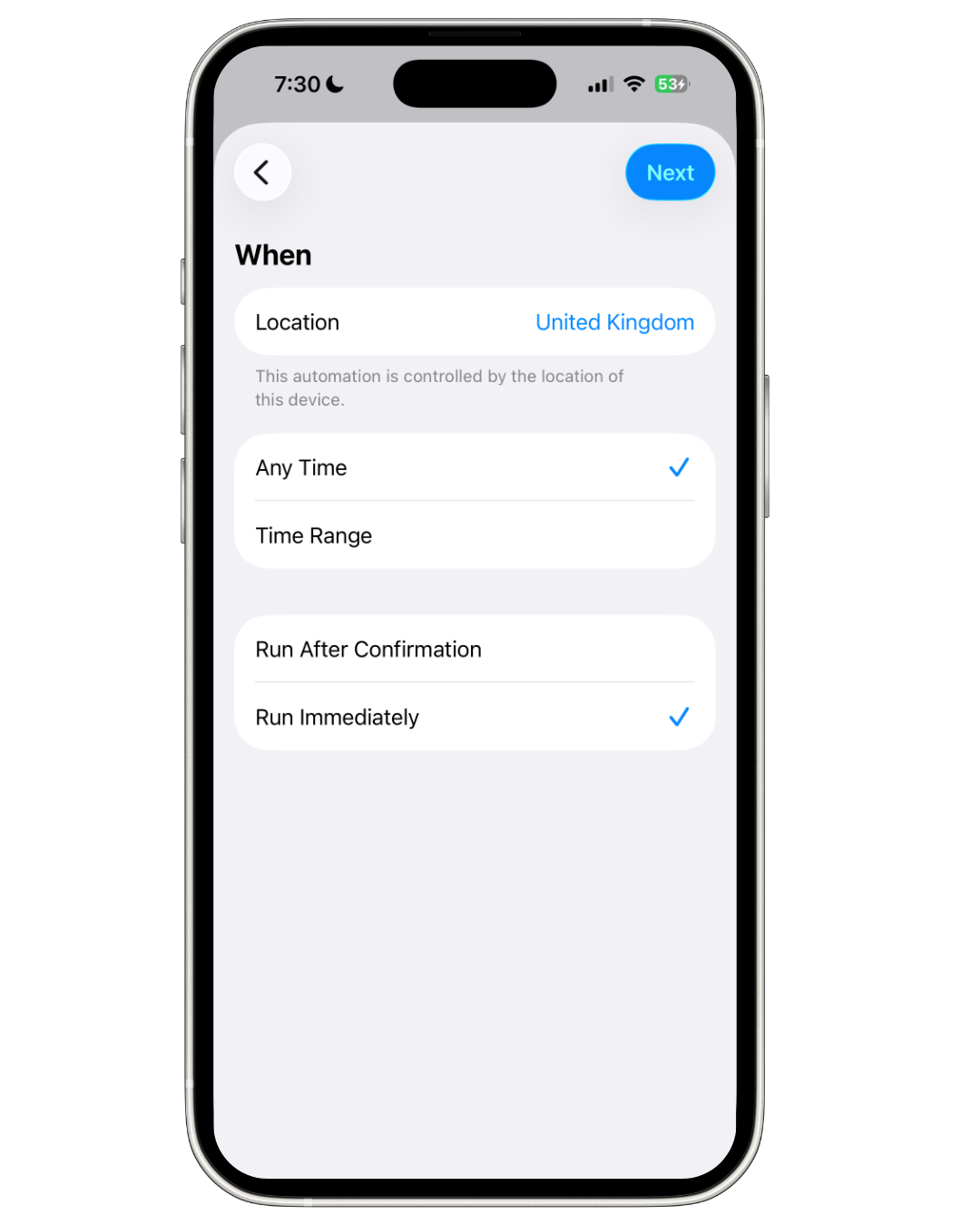
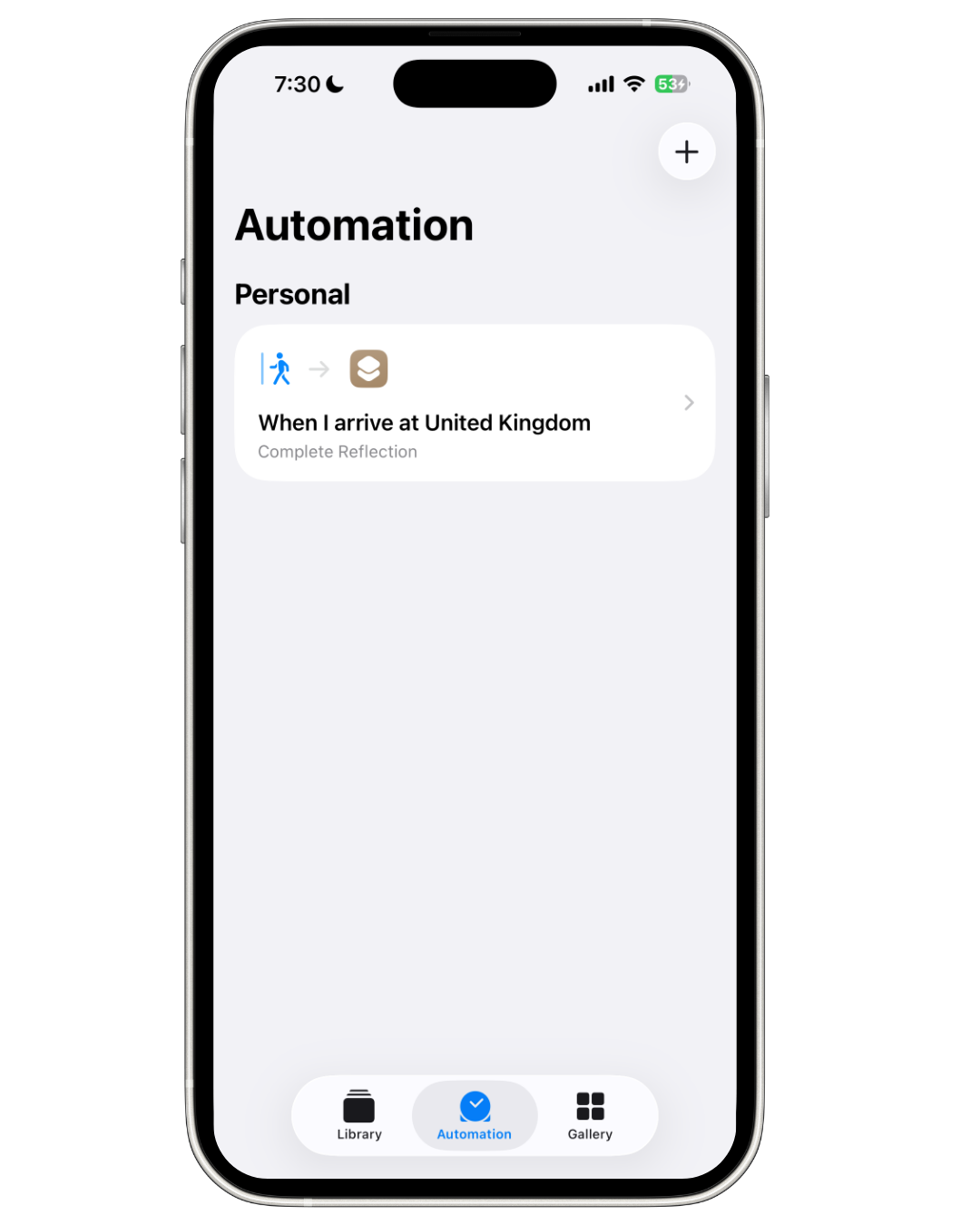
Step 6: Your automation is ready
The automation now appears in your Automation tab. Whenever you arrive at the selected location, your habit will be automatically marked as complete.
Want a habit tracker built for automation? Daily offers full iOS Shortcuts support with actions for completing, incrementing, and managing habits, plus widgets, Apple Watch, and NFC tag support for the fastest possible tracking. Track up to 5 habits free.
#Creating a Workout-Triggered Automation
For fitness habits, trigger completion when you finish an Apple Fitness workout:
- Create a new automation and select Apple Watch Workout
- Choose "Workout Ends" and optionally filter by workout type
- Add your habit app's completion action
- Select your exercise habit
#5 Powerful Habit Automation Ideas
#1. Morning Routine When You Disable Your Alarm
Trigger: When you stop your morning alarm Action: Complete "Wake Up Early" habit
This ensures your morning routine habit is logged the moment you're actually awake.
#2. Workout Logged After Apple Fitness
Trigger: Apple Watch Workout ends Action: Complete "Exercise" habit
Never forget to log your workout. It happens automatically when you finish.
#3. Reading Habit When Sleep Focus Activates
Trigger: Sleep Focus turns on Action: Complete "Read Before Bed" habit
If you read every night before sleep, this captures the habit when you wind down. Pair this with a solid evening routine for even better results.
#4. Gym Arrival Confirmation
Trigger: Arrive at gym location Action: Complete "Go to Gym" habit
Your phone knows when you showed up, so let it track for you.
#5. Journaling When You Open Notes
Trigger: Open Notes app in the evening Action: Complete "Daily Journal" habit
If journaling happens in a specific app, automate the tracking.
#Troubleshooting Common Issues
Here's a quick-reference guide for the most common problems with habit automations:
| Problem | Likely Cause | Fix |
|---|---|---|
| Automation not triggering | "Ask Before Running" enabled | Disable it in automation settings |
| Location trigger delayed | GPS accuracy or geofence too small | Increase geofence radius in location settings |
| Habit app not in Shortcuts | App not updated or doesn't support Shortcuts | Update the app; check App Store description for Shortcuts support |
| Permission denied error | Scripts not allowed | Settings → Shortcuts → Advanced → Enable "Allow Running Scripts" |
| Automation stops working after iOS update | Automation reset by system | Re-create the automation after updating iOS |
| Habit completed twice | Multiple overlapping triggers | Remove duplicate automations in the Automation tab |
According to Apple Support, some automations require confirmation before running. If your automation isn't working silently, double-check that "Run Immediately" is enabled and "Notify When Run" is toggled on so you can verify it's firing.
#The Fastest Ways to Track Habits on iPhone
While automation is powerful, it only works for habits with clear triggers. For everything else, you want fast manual tracking that removes friction.
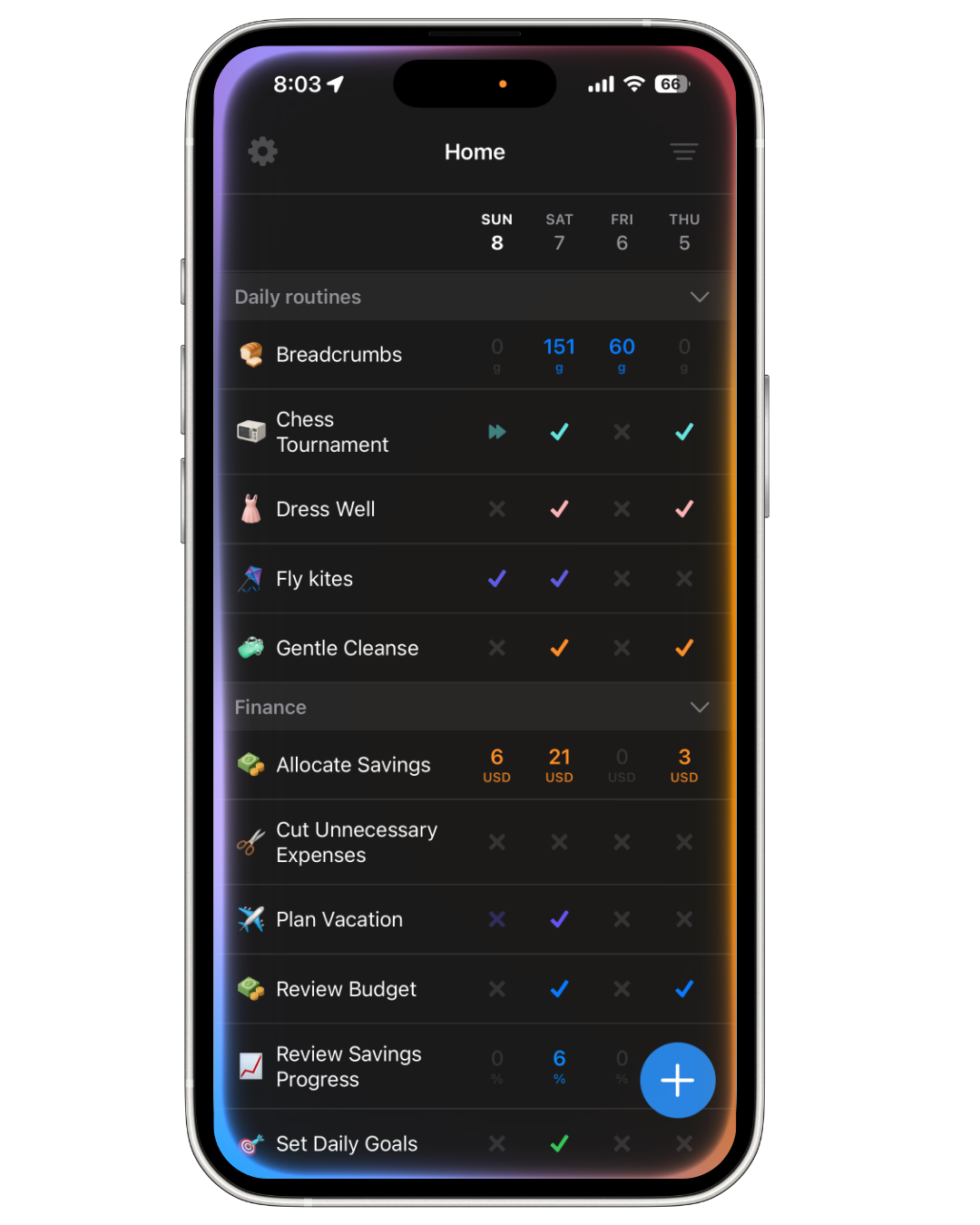
Daily combines multiple quick-logging methods:
- Siri Shortcuts Integration: Say "Hey Siri, log my morning routine" to instantly mark habits complete, with no screens and no tapping
- Home Screen Widgets: Complete habits without even opening the app
- Lock Screen Widgets: Fastest possible access on iOS 16+
- Apple Watch Support: Track from your wrist throughout the day
- NFC Tag Support: Tap a physical tag to instantly log habits
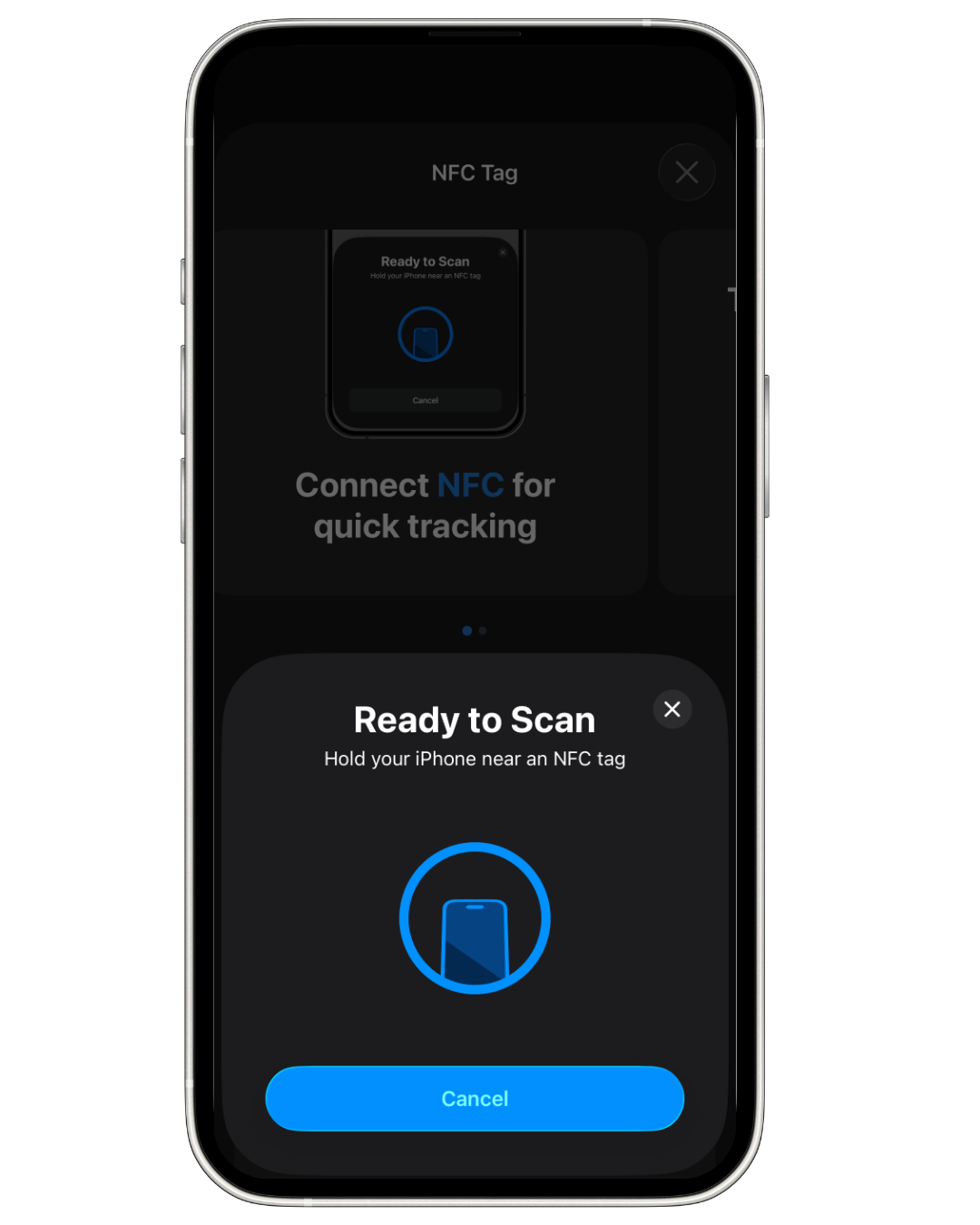
The key is having multiple options so tracking never becomes a barrier. Whether you prefer full automation, voice commands, NFC tags, or a quick tap, the best habit tracker is one that fits your workflow.
#The Science Behind Automated Tracking
Research on habit formation shows that tracking increases success rates, but only when tracking itself doesn't become a burden. The power of iOS automations goes beyond convenience: they tap into well-established psychological principles that make habits stick.
#Automations as Digital Implementation Intentions
In psychology, an implementation intention is a plan that links a specific situation to a specific action: "When X happens, I will do Y." Research by Gollwitzer and Sheeran (2006) found that people who form implementation intentions are 2 to 3 times more likely to follow through on their goals compared to those who rely on motivation alone.
iOS Shortcuts automations are essentially digital implementation intentions. When you set up "When I arrive at the gym, mark 'Exercise' complete," you're creating an if-then plan that your phone enforces for you. The automation removes the decision point entirely, which is exactly why implementation intentions work: they shift behavior from conscious deliberation to automatic response.
This same principle underlies habit stacking, where you attach a new habit to an existing one. Automations take the concept further by making the "stack" completely automatic.
#Reducing Tracking Friction
A major meta-analysis by Harkin et al. (2016), covering 138 studies and over 19,000 participants, found that self-monitoring is one of the most effective behavior change techniques, but its effectiveness drops sharply when monitoring requires effort. The easier it is to track, the more consistently people do it.
Gardner, Lally, and Wardle (2012) showed that automaticity, performing a behavior without conscious thought, is the key feature that distinguishes a true habit from a behavior you simply repeat. By removing the tracking step entirely, automated habit logging lets you focus on the habit itself rather than the act of recording it.
This is why the best habit-building strategies emphasize reducing friction at every step. Automation is the ultimate friction-reducer for tracking.
#How Long Until Habits Become Natural?
One of the most-cited studies on habit formation comes from Lally et al. (2010), who found that it takes an average of 66 days for a new behavior to become automatic, with a range from 18 to 254 days depending on the person and the behavior.
During this critical formation period, consistency matters more than anything else. Automated tracking serves as a bridge: it keeps your streak alive and your data accurate while the habit is still fragile. As James Clear writes in Atomic Habits, "The most effective form of motivation is progress." Seeing an unbroken streak, maintained automatically, provides exactly that motivation.
Once the behavior becomes truly automatic (around that 66-day mark), the tracking becomes a record of your established routine rather than a crutch. But the data remains valuable for spotting regressions and maintaining long-term accountability.
#Frequently Asked Questions
#Do iOS Shortcuts work with all habit tracker apps?
No. The app must specifically support Apple's Shortcuts framework by providing actions like "Complete Habit." Not all habit trackers offer this integration. Daily is one app that provides full Shortcuts support, including actions for completing individual habits, completing all habits, and incrementing habit counts. Check an app's App Store description or website to confirm Shortcuts support before purchasing.
#Can I automate multiple habits with a single trigger?
Yes. You can add multiple "Complete Habit" actions within a single Shortcut, and that Shortcut can be triggered by one automation. For example, a morning alarm trigger could complete "Wake Up Early," "Take Vitamins," and "Drink Water" all at once. You can also use the "Complete All Habits" action if your app supports it to mark every habit for the day as done.
#Does location-based automation drain my iPhone battery?
Location-based automations use Apple's built-in geofencing, which is highly optimized and uses minimal battery. Apple's geofencing relies on cell towers, Wi-Fi, and GPS efficiently and does not continuously poll your location. Most users report no noticeable battery impact from a few location-based automations. However, adding dozens of location triggers could have a small cumulative effect.
#Will my automated habits still count if I'm offline?
Yes. iOS Shortcuts automations run locally on your device and do not require an internet connection. The habit will be marked complete in your app's local data immediately. If your app syncs to a cloud service, the sync will happen the next time you're connected. Your streak and completion data remain accurate regardless of connectivity.
#How many automations can I create in iOS Shortcuts?
Apple does not publish a hard limit on the number of personal automations you can create. Users have reported running 20 or more automations without issues. The practical limit depends on your device's resources, but for habit tracking purposes, you're unlikely to hit any ceiling. Start with your most important habits and add more automations as you get comfortable with the system.
#Start Automating Your Habits Today
The best habit tracking system is one you don't have to think about. Here's how to get started in five steps:
- Pick one habit to automate. Choose a habit with a clear, reliable trigger (arriving at a location, finishing a workout, or a specific time of day). Start simple.
- Download a Shortcuts-compatible tracker. You need an app that supports iOS Shortcuts actions. Daily offers full Shortcuts integration along with widgets and Apple Watch support, free to start with up to 5 habits.
- Build your first automation. Follow the step-by-step walkthrough above. A time-based trigger is the easiest to start with and the most reliable.
- Verify it works for 3 days. Enable "Notify When Run" so you can confirm the automation fires correctly. Adjust the trigger if needed.
- Add one more automation each week. Once your first automation is reliable, layer on additional triggers. Within a month, you'll have a fully automated tracking system that captures your habits without any effort.
The research is clear: people who monitor their habits are significantly more likely to maintain them, and removing friction from tracking makes monitoring sustainable long-term. iOS Shortcuts lets you build a system that handles the tracking so you can focus on what matters: actually doing the habits.
#References
- Apple Shortcuts User Guide. Official documentation for iOS Shortcuts.
- Create Personal Automations, Apple Support. Guide to setting up personal automations.
- Gollwitzer, P. M., & Sheeran, P. (2006). Implementation intentions and goal achievement: A meta-analysis of effects and processes. Advances in Experimental Social Psychology, 38, 69–119.
- Harkin, B., Webb, T. L., Chang, B. P. I., et al. (2016). Does monitoring goal progress promote goal attainment? A meta-analysis of the experimental evidence. Psychological Bulletin, 142(2), 198–229.
- Gardner, B., Lally, P., & Wardle, J. (2012). Making health habitual: The psychology of "habit-formation" and general practice. British Journal of General Practice, 62(605), 664–666.
- Lally, P., van Jaarsveld, C. H. M., Potts, H. W. W., & Wardle, J. (2010). How are habits formed: Modelling habit formation in the real world. European Journal of Social Psychology, 40(6), 998–1009.
- Clear, James. Atomic Habits: An Easy & Proven Way to Build Good Habits & Break Bad Ones. Avery, 2018.
- iOS Geofencing and Location Services, Apple Developer. Technical documentation on how iOS handles location-based triggers.